Please review the sections below for instructions on how to register your booth staff team.

Complimentary Exhibitor Badges: Exhibitors receive 5 Exhibitor Complimentary Expo Plus Passes per 100 Square Feet of contracted booth space.

Additional Exhibitor Badges: Exhibitor Manager's are able to purchase additional Exhibitor Expo Plus Passes in their registration account for $75 each.

Exhibitor [Complimentary] Expo Plus Passes have the same access as the Expo Plus Pass.

CO-EXHIBITORS:

  1. Primary Exhibitors will not receive additional Exhibitor Complimentary Expo Plus Passes for co-exhibitors. The Exhibitor Complimentary Expo Plus Pass allotment remains the same when co-exhibitors are added to a booth – 5 per 100 Square Feet of contracted booth space.
  2. Co-exhibiting companies are not added into the badge registration system – Primary Exhibitors will need to register their Co-Exhibitor badges under their own badge registration account using their Exhibitor Complimentary Expo Plus Pass allotment or purchasing additional Exhibitor Expo Plus Passes.

Exhibitor [Complimentary] Expo Plus Passes have the same event access as the Expo Plus Pass, plus the following:

Exhibitor Move-in Days
Expo Floor Access from 8:00 AM - 5:00 PM

  • Friday – October 9*
  • Saturday – October 10*
  • Sunday – DARK DAY (No Exhibitor Move-in)
  • Monday – October 12

*Targeted Exhibitors Only 

Expo Days Extra Access

  • Expo Floor Early Access – 8:00 AM - 10:00 AM
  • Expo Floor Late Access – 5:00 PM - 6:00 PM

Content Access for Exhibitor [Complimentary] Expo Plus Passes

  • Expo Floor Theaters (Meet the Experts Theaters)
  • TechTALKS
  • CEO Summit Keynotes

1. As the Primary Booth Contact for your company:

  • The badge registration system will recognize your email address as the Exhibitor Manager.
  • The Registrant Type 'Exhibitor Manager' option will be available for you to select.
  • NOTE: If the badge registration system does not recognize your email address as the Exhibitor Manager, please contact [email protected].

2. Exhibitor Managers Register Yourself(Even if you are not attending SEMICON West 2026)

  1. SEMICON West 2026 Badge Registration
  2. Click the Yes button under "I Acknowledge" to agree to the Privacy Policy.
  3. Enter your email address and select the Tab button on your keyboard.
  4. Select Yes or No if you will be attending SEMICON West 2026.
  5. Select the Registrant Type: Exhibitor Manager.

NOTE: Changes to your badge registration account are not final until you have reached the Confirmation Page (last page).

PLEASE NOTE: As the Exhibitor Manager for your team:

If you are not attending SEMICON West 2026 – you will not see this page.

If you are attending SEMICON West 2026 – you can update your pass type here to the Thought Leadership or All Access pass. This selection is only for your personal pass.

NOTE: Changes to your badge registration account are not final until you have reached the Confirmation Page (last page).

PLEASE NOTE: As the Exhibitor Manager for your team, if you are not attending SEMICON West 2026 – this page will be Step 2 for you.

1. Complete the work contact information fields on this page.

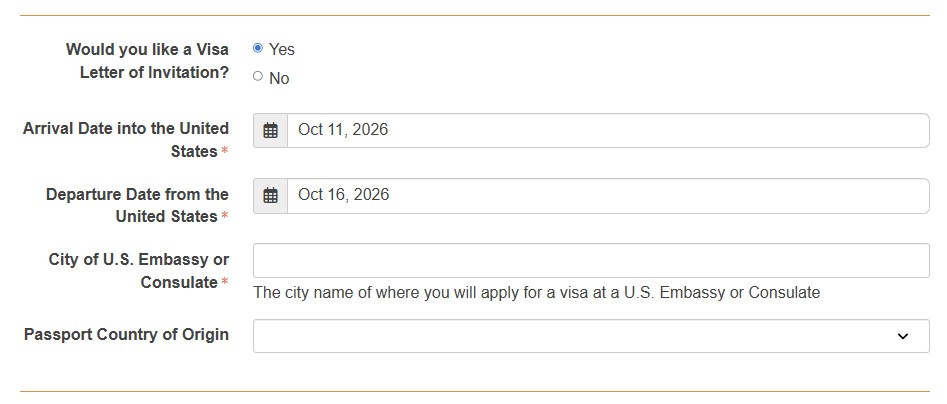
2. If you need a Letter of Invitation to assist with acquiring a visa for travel into the United States, the option to request one is available during this step. If the Work address entered is not in the United States, select “Yes” to needing a Visa Letter of Invitation and fill out the additional required information.
Centered Image

For completed badge registrations, Visa Letters of Invitation will be processed in 5 business days and sent in PDF format via email.

If a badge registration confirmation email was not received, the badge registration is not complete (be sure to check spam/junk folders) and a Letter of Invitation will not be processed.

3. Accessibility accommodations are also available during this step.

NOTE: Changes to your badge registration account are not final until you have reached the Confirmation Page (last page).

PLEASE NOTE: As the Exhibitor Manager for your team, if you are not attending SEMICON West 2026 – you will not see this page.

Complete the demographic question fields on this page.

NOTE: Changes to your badge registration account are not final until you have reached the Confirmation Page (last page).

PLEASE NOTE: As the Exhibitor Manager for your team, if you are not attending SEMICON West 2026 – this page will be Step 3 for you.

On this page you are able to add the following items a-la-carte to your Exhibitor Badge registration:

  • SEMI U Courses (Monday, Tuesday, Thursday)
  • Market Symposium (Monday)
  • APHI Forum + Reception (Wednesday)
  • Test Vision Symposium (Wednesday)
  • Cybersecurity Forum (Wednesday)

NOTE: Changes to your badge registration account are not final until you have reached the Confirmation Page (last page).

PLEASE NOTE: As the Exhibitor Manager for your team, if you are not attending SEMICON West 2026 – this page will be Step 4 for you.

Accept the following:

  • SEMICON West Terms and Conditions
  • SEMI Global Code of Conduct

NOTE: Changes to your badge registration account are not final until you have reached the Confirmation Page (last page).

PLEASE NOTE: As the Exhibitor Manager for your team, if you are not attending SEMICON West 2026 – this page will be Step 5 for you.

Your Included Pass Count: This is based on your booth size, see the Exhibitor Badge Allotments information above.

Step 1: Add Your Pass Types (Complimentary; Paid if needed):

  1. First – Add the Exhibitor Complimentary Expo Plus Pass allotted based on your booth size.
  2. Second – If you need more Exhibitor passes than your allotted amount, you can add addtional exhibitor paid passes in this step.

Step 2: Assign booth staff to the passes. You can come back to this step at any time.

Step 3: Click the "Continue" button to move on to the next step.

  • If you have a Balance Due, you will be taken to the Payment page.
  • If no Balance Due, then you will arrive at your confirmation page.
  • Once confirmed, your team members will receive an email with a link to complete their badge registration.

NOTE: Changes to your badge registration account are not final until you have reached the Confirmation Page (last page).

PLEASE NOTE: As the Exhibitor Manager for your team, if you are not attending SEMICON West 2026 – this page will be Step 6 for you.

1. From this Confirmation page, you are able to:

  • View your Registration Record Details, Selections and Transactions made.
  • Download your receipt for your expense report.
  • Add SEMICON West 2026 to your calendar. 

2. You will receive an email confirmation (even if you are not attending).

3. Your team will receive their own confirmation emails after they complete their badge registration.

NOTE: Changes to your badge registration account are not final until you have reached the Confirmation Page (last page).

If you or someone on your team needs a Letter of Invitation to assist with acquiring a visa for travel into the United States, the option to request one is available in the "Your Info" step of the Exhibitor [Complimentary] Expo Plus Pass registration process.

  • On the "Your Info” tab, the Letter of Invitation request option will display when the Country entered is not “United States.”
  • Select “Yes” to request a Letter of Invitation and fill out the additional information needed.
  • Visa Letters of Invitation will be processed in 5 business days and sent in PDF format via email.

If you forget to request a visa Letter of Invitation during the registration process, please use the Modify Registration link in your registration confirmation email to go back into your account and request a Letter of Invitation.

SEMICON West Exhibitor Registration Customer Care Team

Phone: +1 985-240-5511

Email: [email protected]

Hours of Operation: 8:00 AM - 5:00 PM (CST)